/*
 * Author : kunchala Anil
 * Email : anilkunchalaece@gmail.com
 * Date : 22 May 2018
 *
 * This sketch is used to calculate angle from MPU6050 Accelerometer values
 * crust of the sketch is
 *        float pitch = atan(accX/sqrt(pow(accY,2) + pow(accZ,2)));
 *         float roll = atan(accY/sqrt(pow(accX,2) + pow(accZ,2)));
 *
 * Check following https://cache.freescale.com/files/sensors/doc/app_note/AN3461.pdf
 * i didnt understand the math behind it
 */

#include <Wire.h>
#include <math.h>

const long ACCR_SENSITIVITY_SCALE_FACTOR = 16384.0; // for 2g
const int MPU6050_ADDR = 0b1101000;

const byte PWR_REG_ADDR = 0x6B;

const byte ACCR_CONFIG_REG_ADDR = 0x1C;
const byte ACCR_READ_START_ADDR = 0x3B;

int16_t accX,accY,accZ;
double angleX,angleY;
double aX,aY,aZ;

void setup() {
 Wire.begin();
 Serial.begin(115200);
 configureMPU();
}//end of setup

void loop() {
  readAccrX();
// apply trigonometry to get the pitch and roll:
float pitch = atan(accX/sqrt(pow(accY,2) + pow(accZ,2)));
float roll = atan(accY/sqrt(pow(accX,2) + pow(accZ,2)));
//convert radians into degrees
pitch = pitch * (180.0/PI);
roll = roll * (180.0/PI);


  Serial.print(pitch);
  Serial.print("   ");
  Serial.println(roll);
  delay(100);
}//end of loop

void readAccrX(){
   Wire.beginTransmission(MPU6050_ADDR);
  Wire.write(ACCR_READ_START_ADDR);  // starting with register 0x3B (ACCEL_XOUT_H)
  Wire.endTransmission(false);
  Wire.requestFrom(MPU6050_ADDR,6,true);
  accX=Wire.read()<<8|Wire.read();
  accY=Wire.read()<<8|Wire.read();
  accZ=Wire.read()<<8|Wire.read();
//  Serial.println(accX);
//  aX = accX / ACCR_SENSITIVITY_SCALE_FACTOR;
//  aY = accY / ACCR_SENSITIVITY_SCALE_FACTOR;
//  aZ = accZ / ACCR_SENSITIVITY_SCALE_FACTOR;

}//end of readGyroX Fcn

void configureMPU(){
  //Power Register
  Wire.beginTransmission(MPU6050_ADDR);
  Wire.write(PWR_REG_ADDR);//Access the power register
  Wire.write(0b00000000);
  Wire.endTransmission();

  //Gyro Config
  Wire.beginTransmission(MPU6050_ADDR);
  Wire.write(ACCR_CONFIG_REG_ADDR);
  Wire.write(0b00000000);
  Wire.endTransmission();
}//end of setUpMPU Fcn
Wednesday, 30 May 2018
Reading Accelerometer Angles

Monday, 21 May 2018
MPU6050 - Calculating the Angle from Gyroscope Angular Rate
/*
 * Author : kunchala Anil
 * Email : anilkunchalaece@gmail.com
 * Date : 21 May 2018
 *
 * This sketch is used to calculate angle from MPU6050 GyroScope Angular Rate
 * Ingridient of sketch is
 *     Angle = prevAngle + presentAngularRate * dt
 *     prevAngle = Angle
 *
 *     dt -> time elapsed from the last angular rate reading
 *
 *     Offset Value is used to slow the Gyro Drift
 *
 *  For discussion on the code ref : http://forum.arduino.cc/index.php?topic=548675
 */
#include <Wire.h>
const float GYRO_SENSITIVITY_SCALE_FACTOR = 131.0; //for 200 degrees / sec
const int MPU6050_ADDR = 0b1101000;
const byte PWR_REG_ADDR = 0x6B;
const byte GYRO_CONFIG_REG_ADDR = 0x1B;
const byte GYRO_READ_START_ADDR = 0x43;
int16_t gyroX;
float rotX; // It is Angular Rate
float prevRotX=0;
unsigned long prevTime=0,currentTime;

float offsetVal;
const int noOfSamplesForOffset = 1000;

void setup() {
 Wire.begin();
 Serial.begin(115200);
 configureMPU();

  float totalVal = 0;
  for (int i=0; i< noOfSamplesForOffset; i++){
    readGyroX();
    Serial.println(rotX);
    totalVal = totalVal + (rotX);
  }//end of for
  Serial.println(totalVal);
 offsetVal = totalVal / (noOfSamplesForOffset);
 Serial.print("offset Val");
 Serial.println(offsetVal);
 //while(1);
}//end of setup

void loop() {

  if(prevTime == 0){
    readGyroX();
    prevTime = millis();
  }else{
    readGyroX();

    currentTime = millis();
    double dt = (currentTime - prevTime)/1000.0;
    prevTime = currentTime;
    rotX =  prevRotX + (rotX-offsetVal)* dt;
    prevRotX = rotX;
    Serial.println(rotX);
  }//end of ifElse
  delay(100);
}//end of loop

void readGyroX(){
   Wire.beginTransmission(MPU6050_ADDR);
  Wire.write(GYRO_READ_START_ADDR);  // starting with register 0x3B (ACCEL_XOUT_H)
  Wire.endTransmission(false);
  Wire.requestFrom(MPU6050_ADDR,2,true);
  gyroX=Wire.read()<<8|Wire.read();  // 0x43 (GYRO_XOUT_H) & 0x44 (GYRO_XOUT_L)
  rotX = gyroX / GYRO_SENSITIVITY_SCALE_FACTOR;
}//end of readGyroX Fcn

void configureMPU(){
  //Power Register
  Wire.beginTransmission(MPU6050_ADDR);
  Wire.write(PWR_REG_ADDR);//Access the power register
  Wire.write(0b00000000);
  Wire.endTransmission();

  //Gyro Config
  Wire.beginTransmission(MPU6050_ADDR);
  Wire.write(GYRO_CONFIG_REG_ADDR);
  Wire.write(0b00000000);
  Wire.endTransmission();
}//end of setUpMPU Fcn
Wednesday, 14 March 2018
Checking Basic Lift - using Single Channels
Checking all connections in Flight Controller board "ok" on board using simple Sketch
Channel 3 (Throttle) is used for checking the functionality.
Channel 3 (Throttle) is used for checking the functionality.
/*
  Author : Kunchala Anil
  email : anilkunchalaece@gmail.com
  Date : 14 Mar 2018

  Checking the altitude of KSRM Quad


*/
/*
   Connect Channel 3 to pin 10 i.e PCINT2
   Arm the all the Motors
   use Servo Write to Send the control signal to ESC

        To Arm ESC use value 60
        Max Speed Can be Achieved using 130

        Pulse Width when Throttle at Minimum position is : 1150
        Pulse width when Throttle at Maximum Posistion is : 1800

        we need to map value from 1200-1800 to 60 to 130
*/


//PCMSKx - Pin Change Mask Register
//PCMSK0 - portB (D8-D13) (PCINT0  - PCINT6)
//PCMSK1 - portC (A0-A5)  (PCINT8  - PCINT14)
//PCMSK2 - portD (D0-D7)  (PCINT16 - PCINT23)
//PCICR -  Pin Change Interrupt Control Register
//  PCIE0 - Pin Change Interrupt Enable 0 - Port B (D8-D13)
//  PCIE1 - Pin Change Interrupt Enable 1 - Port C (A0-A5)
//  PCIE2 - Pin Change Interrupt Enable 2 - Port D (D0-D7)

#include<Servo.h>

#define rxPin 10
#define DEBUG

//MotorConnections

#define topLeftMotorPin 4
#define topRightMotorPin 5
#define bottomLeftMotorPin 6
#define bottomRightMotorPin 7

#define motorArmValue 60
#define motorMinValue 65
#define motorMaxValue 130

#define throttleMinValue 1200
#define throttleMaxValue 1800

volatile boolean recvPCInt = false;
volatile byte portValue;
unsigned long pwmDuration;
unsigned long pwmStart;
unsigned long pwmEnd;

Servo topLeftMotor;
Servo topRightMotor;
Servo bottomLeftMotor;
Servo bottomRightMotor;

//Interrupt Service Routine will fire when for PinChange in PortB
ISR(PCINT0_vect) {
  recvPCInt = true;
  portValue = PINB; //PINB is used to read all port input values
}

void updateMotors(int val) {
  topLeftMotor.write(val);
  topRightMotor.write(val);
  bottomLeftMotor.write(val);
  bottomRightMotor.write(val);
#ifdef DEBUG
  Serial.print("motors are updated with value => ");
  Serial.println(val);
#endif
}


void initializeMotors() {
  topLeftMotor.attach(topLeftMotorPin);
  topRightMotor.attach(topRightMotorPin);
  bottomLeftMotor.attach(bottomLeftMotorPin);
  bottomRightMotor.attach(bottomRightMotorPin);
#ifdef DEBUG
  Serial.println("motors initialized");
#endif
}//end of initializeMotorsFunction


void armAllMotors() {
  topLeftMotor.write(motorArmValue);
  topRightMotor.write(motorArmValue);
  bottomLeftMotor.write(motorArmValue);
  bottomRightMotor.write(motorArmValue);
#ifdef DEBUG
  Serial.println("motors are Armed ");
#endif
}//end of armAllMotors function


void setup() {
  cli(); //Clear all interrupts
  PCICR |= 1 << PCIE0; //Enable port B Registers i.e D8-D13
  PCMSK0 |= 1 << PCINT2;// Pin9
  sei(); //enable all interrupts
  pinMode(rxPin, INPUT);
  digitalWrite(rxPin, HIGH); //enable pull up in pin
#ifdef DEBUG
  Serial.begin(9600);
#endif
  initializeMotors();
  armAllMotors();
}//end of setup

void loop() {
  if (recvPCInt == true) {
    boolean event = digitalRead(rxPin);
    if (event == HIGH)
    {
      pwmStart = micros();
    }
    else if (event == LOW) {
      pwmEnd = micros();
      int width = pwmEnd - pwmStart;

      int mappedValue = map(width, throttleMinValue, throttleMaxValue, motorMinValue, motorMaxValue);

       updateMotors(mappedValue);

#ifdef DEBUG
      Serial.print("Throttle Value is  ");
      Serial.println(pwmEnd - pwmStart);
#endif
    }
    recvPCInt = false;
  }//end of If

}//end of loop
Tuesday, 6 March 2018
Multi Channel Receiver Signals using Pin Change Interrupts - Reading Four Channels Simultaneously
The main Logic is :
1.Calculate PWM Starting Value during Raising Edge
2.When Falling Edge Detected Calculate Width
1.Calculate PWM Starting Value during Raising Edge
2.When Falling Edge Detected Calculate Width
/*
   Author : Kunchala Anil
   Email : anilkunchlaece@gmail.com
   Date : 6 Mar 2018
   Pin Change Interrupts - Single Rx Channel i.e Single PWM Wave
  PCMSKx - Pin Change Mask Register
  PCMSK0 - portB (D8-D13) (PCINT0  - PCINT6)
  PCMSK1 - portC (A0-A5)  (PCINT8  - PCINT14)
  PCMSK2 - portD (D0-D7)  (PCINT16 - PCINT23)
  PCICR -  Pin Change Interrupt Control Register
    PCIE0 - Pin Change Interrupt Enable 0 - Port B (D8-D13)
    PCIE1 - Pin Change Interrupt Enable 1 - Port C (A0-A5)
    PCIE2 - Pin Change Interrupt Enable 2 - Port D (D0-D7)
*/

/*#############################
  Rx Connections
  Ch1 = D8 PCINT0
  Ch2 = D9 PCINT1
  Ch3 = D10 PCINT2
  Ch4 = D11 PCINT3
*/
#define DEBUG // comment it out to disable the debug mode

volatile boolean recvPCInt = false; //to know interrupt status
volatile int portValue;

//used to store the pwm duration
volatile unsigned long pwmDuration[4];
volatile unsigned long pwmStart[4];
unsigned long pwmEnd[4];

//pinDeclaration for Rx
const byte rxCh[] = {8, 9, 10, 11};
const byte noOfChannels = sizeof(rxCh);

//portStatus
volatile int prevPortState[] = {0, 0, 0, 0};
volatile int presentPortState[4];

//Interrupt Service Routine will fire when for PinChange in PortB
ISR(PCINT0_vect) {
  recvPCInt = true;
  for (int ch = 0; ch < noOfChannels ; ch++) {
    presentPortState[ch] = digitalRead(rxCh[ch]);
  }//end of for loop

  for (int c = 0; c < noOfChannels ; c++) {
    if (prevPortState[c] == 0 & presentPortState[c] == 1) {
      //if previous state is 0 and present state is 1 (Raising Edge) then take the time stamp
      pwmStart[c] = micros();
      prevPortState[c] = 1; //update the prevPort State
    } else if (prevPortState[c] == 1 & presentPortState[c] == 0) {
      //if previous state is 1 and present state is 0 (Falling Edge) then calculate the width based on the change
      pwmDuration[c] = micros() - pwmStart[c];
      prevPortState[c] = 0; //update Present PortState
    }
  }//end of for loop
  //portValue = PINB & 0x0f;//we are only intrested in first four bits
}

void setup() {
  cli(); //Clear all interrupts
  PCICR |= 1 << PCIE0; //Enable port B Registers i.e D8-D13
  PCMSK0 |= (1 << PCINT0) | (1 << PCINT1) | (1 << PCINT2) | (1 << PCINT3);// Pin8,9,10,11
  sei(); //enable all interrupts

#ifdef DEBUG
  Serial.begin(9600);
  Serial.println("DEBUG mode Enabled");
#endif

  for (int ch = 0 ; ch < noOfChannels; ch++) {
    pinMode(rxCh[ch], INPUT_PULLUP); //make pin input with pullup enabled
  }//end of for loop

}//end of setup

void checkForRxPulseWidths() {
  for (int i = 0; i < noOfChannels ; i++ ) {
#ifdef DEBUG
    Serial.print("ch => ");
    Serial.print(i);
    Serial.print(" pulseWidth ");
    Serial.println(pwmDuration[i]);
#endif
  }
}

void loop() {
  if (recvPCInt == true) {
    checkForRxPulseWidths();
    recvPCInt = false;
  }//end of if
}//end of loop
Friday, 2 March 2018
Reading PWM Signals using Pin Change Interrupts
To Measure a PWM wave using Arduino we can follow any one of following ways
1. built-in pulseIn function
2. Timer and External Interrupts
3. Pin Change Interrupts
Below Code is used to measure PWM width when connected to pin 9
1. built-in pulseIn function
2. Timer and External Interrupts
3. Pin Change Interrupts
Below Code is used to measure PWM width when connected to pin 9
//   Pin Change Interrupts
//PCMSKx - Pin Change Mask Register
//PCMSK0 - portB (D8-D13) (PCINT0  - PCINT6)
//PCMSK1 - portC (A0-A5)  (PCINT8  - PCINT14)
//PCMSK2 - portD (D0-D7)  (PCINT16 - PCINT23)
//PCICR -  Pin Change Interrupt Control Register
//  PCIE0 - Pin Change Interrupt Enable 0 - Port B (D8-D13)
//  PCIE1 - Pin Change Interrupt Enable 1 - Port C (A0-A5)
//  PCIE2 - Pin Change Interrupt Enable 2 - Port D (D0-D7)

volatile boolean recvPCInt = false;
volatile byte portValue;
unsigned long pwmDuration;
unsigned long pwmStart;
unsigned long pwmEnd;


//Interrupt Service Routine will fire when for PinChange in PortB
ISR(PCINT0_vect){
  recvPCInt = true;
  portValue = PINB; //PINB is used to read all port input values
}

void setup() {
cli(); //Clear all interrupts
PCICR |= 1 << PCIE0; //Enable port B Registers i.e D8-D13
PCMSK0 |= 1 << PCINT1;// Pin9
sei(); //enable all interrupts
pinMode(9,INPUT);
digitalWrite(9,HIGH);//enable pull up in pin 9
Serial.begin(9600);
}

void loop() {
  if(recvPCInt == true){
     boolean event = digitalRead(9);
     if(event == HIGH)
        {
          pwmStart = micros();
        }
       else if(event == LOW){
          pwmEnd = micros();
        Serial.println(pwmEnd-pwmStart);
       }
     recvPCInt = false;
  }
}
Thursday, 6 July 2017
nrf51 - dk with arm gcc and ubuntu
Recently i bought the nrf51-dk. it consist of nrf51422 SoC which is similar to nrf51822SoC without ANT protocol. nrf51822 is the BLE4.2 SoC. i am trying my luck with beacons.
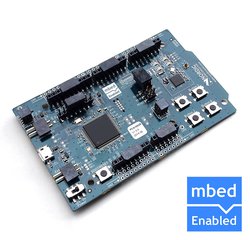
nrf51822 is mbed enabled i.e we can program it using mBed online compiler and nordic also provides support for following development options.
1. Keil uVision - most of nordic official document comes with Keil example's.
2. IAR
3. ARM GCC
In this post i will cover arm gcc setup using nordic command line tools on linux (ubuntu) to compile and flash the given examples.
watch the video of total procedure here
1.Download the required softwares from Nordic here (look under Downloads)
a. nRF5-SDK
b. nRF5X-Command-Line-Tools
2. GNU ARM Embedded tool chain from here
3. Segger JLink Software from here
install the segger jlink software using command
sudo dpkg -i segerJlinkFile.deb
it will be installed under /opt/segger
sdk,command line tools and gnu arm tools chain comes as .tar packages. untar them and place them in directory.
go to your arm gcc tool chain folder
cd <ARM_GCC_FOLDER>
ls
you can find following folders
arm-none-eabi bin lib share
add the bin folder to the path
PATH=$PATH:<ARM_GCC_TOOLCHAIN>/bin
go to your SDK Folder and cd into the
cd <SDK_PATH>/components/toolchain/gcc
and change the Makefile.posix to the following
GNU_INSTALL_ROOT :=<ARM_GCC_FOLDER>
GNU_VERSION := 4.9.3
GNU_PREFIX := arm-none-eabi
then go to the blinky example
cd <nRF5_SDK>/examples/peripheral/blinky
ls
blinky.eww hex main.c pca10028 pca10031 pca10040 pca10056
main.c consist of the instructions pca100xx consist of make file and link files for different versions of dk boards. i am having the pca10028.
cd pca10028
ls
blank s130
s130 is the softdevice implementation. softdevice is the precompiled hex files which consist functions of ble and ant api's.
we are not using soft device
cd blank
ls
arm4 arm5_no_packs armgcc config iar
these are different implementation options. we are using armgcc
cd armgcc
ls
blinky_gcc_nrf51.ld Makefile
we use make file to compile the main.c and generate .hex file. use command make to do that.
make
you will get following on terminal
mkdir _build
Compiling file: nrf_log_backend_serial.c
Compiling file: nrf_log_frontend.c
Compiling file: app_error.c
Compiling file: app_error_weak.c
Compiling file: app_timer.c
Compiling file: app_util_platform.c
Compiling file: hardfault_implementation.c
Compiling file: nrf_assert.c
Compiling file: sdk_errors.c
Compiling file: boards.c
Compiling file: nrf_drv_clock.c
Compiling file: nrf_drv_common.c
Compiling file: nrf_drv_uart.c
Compiling file: nrf_nvic.c
Compiling file: nrf_soc.c
Compiling file: main.c
Compiling file: RTT_Syscalls_GCC.c
Compiling file: SEGGER_RTT.c
Compiling file: SEGGER_RTT_printf.c
Assembling file: gcc_startup_nrf51.S
Compiling file: system_nrf51.c
Linking target: _build/nrf51422_xxac.out
text data bss dec hex filename
3120 112 112 3344 d10 _build/nrf51422_xxac.out
Preparing: _build/nrf51422_xxac.hex
Preparing: _build/nrf51422_xxac.bin
_build/nrf51422_xxac.hex file will flashed to the board. to flash the board nrfcommand line tools are used. go to the command line tools directory
cd <NRF_COMMAND_LINE_TOOLS>
ls
nrfjprog mergehex
add the nrfjprog to the path
PATH=$PATH:<NRFJPROG_DIRECTORY>
and use the following command to flash the device
nrfjprog --family nrf51 --program _build/nrf51422_xxac.hex
after flashing you need to reset the board. use the following command to reset board
nrfjprog --family nrf51 -r
makr some changes in the main.c file and you can reflash the dk.
to erase the pre flashed code we command
nrfjprog --family nrf51 -e
clean the build and build again
make clean
make
then flash and reset again
nrfjprog --family nrf51 --program _build/nrf51422_xxac.hex
nrfjprog --family nrf51 -r
nrf51822 is mbed enabled i.e we can program it using mBed online compiler and nordic also provides support for following development options.
1. Keil uVision - most of nordic official document comes with Keil example's.
2. IAR
3. ARM GCC
In this post i will cover arm gcc setup using nordic command line tools on linux (ubuntu) to compile and flash the given examples.
watch the video of total procedure here
1.Download the required softwares from Nordic here (look under Downloads)
a. nRF5-SDK
b. nRF5X-Command-Line-Tools
2. GNU ARM Embedded tool chain from here
3. Segger JLink Software from here
install the segger jlink software using command
sudo dpkg -i segerJlinkFile.deb
it will be installed under /opt/segger
sdk,command line tools and gnu arm tools chain comes as .tar packages. untar them and place them in directory.
go to your arm gcc tool chain folder
cd <ARM_GCC_FOLDER>
ls
you can find following folders
arm-none-eabi bin lib share
add the bin folder to the path
PATH=$PATH:<ARM_GCC_TOOLCHAIN>/bin
go to your SDK Folder and cd into the
cd <SDK_PATH>/components/toolchain/gcc
and change the Makefile.posix to the following
GNU_INSTALL_ROOT :=<ARM_GCC_FOLDER>
GNU_VERSION := 4.9.3
GNU_PREFIX := arm-none-eabi
then go to the blinky example
cd <nRF5_SDK>/examples/peripheral/blinky
ls
blinky.eww hex main.c pca10028 pca10031 pca10040 pca10056
main.c consist of the instructions pca100xx consist of make file and link files for different versions of dk boards. i am having the pca10028.
cd pca10028
ls
blank s130
s130 is the softdevice implementation. softdevice is the precompiled hex files which consist functions of ble and ant api's.
we are not using soft device
cd blank
ls
arm4 arm5_no_packs armgcc config iar
these are different implementation options. we are using armgcc
cd armgcc
ls
blinky_gcc_nrf51.ld Makefile
we use make file to compile the main.c and generate .hex file. use command make to do that.
make
you will get following on terminal
mkdir _build
Compiling file: nrf_log_backend_serial.c
Compiling file: nrf_log_frontend.c
Compiling file: app_error.c
Compiling file: app_error_weak.c
Compiling file: app_timer.c
Compiling file: app_util_platform.c
Compiling file: hardfault_implementation.c
Compiling file: nrf_assert.c
Compiling file: sdk_errors.c
Compiling file: boards.c
Compiling file: nrf_drv_clock.c
Compiling file: nrf_drv_common.c
Compiling file: nrf_drv_uart.c
Compiling file: nrf_nvic.c
Compiling file: nrf_soc.c
Compiling file: main.c
Compiling file: RTT_Syscalls_GCC.c
Compiling file: SEGGER_RTT.c
Compiling file: SEGGER_RTT_printf.c
Assembling file: gcc_startup_nrf51.S
Compiling file: system_nrf51.c
Linking target: _build/nrf51422_xxac.out
text data bss dec hex filename
3120 112 112 3344 d10 _build/nrf51422_xxac.out
Preparing: _build/nrf51422_xxac.hex
Preparing: _build/nrf51422_xxac.bin
_build/nrf51422_xxac.hex file will flashed to the board. to flash the board nrfcommand line tools are used. go to the command line tools directory
cd <NRF_COMMAND_LINE_TOOLS>
ls
nrfjprog mergehex
add the nrfjprog to the path
PATH=$PATH:<NRFJPROG_DIRECTORY>
and use the following command to flash the device
nrfjprog --family nrf51 --program _build/nrf51422_xxac.hex
after flashing you need to reset the board. use the following command to reset board
nrfjprog --family nrf51 -r
makr some changes in the main.c file and you can reflash the dk.
to erase the pre flashed code we command
nrfjprog --family nrf51 -e
clean the build and build again
make clean
make
then flash and reset again
nrfjprog --family nrf51 --program _build/nrf51422_xxac.hex
nrfjprog --family nrf51 -r
Friday, 25 November 2016
nodemcu Flash Error
Green Led Blinking Continusly
http://www.esp8266.com/viewtopic.php?f=22&t=11431
and curiously i didnt solve my problem..
and i started tinkering with flash baudrate and when i set it to 115200 it is avoided.
http://www.esp8266.com/viewtopic.php?f=22&t=11431
and curiously i didnt solve my problem..
and i started tinkering with flash baudrate and when i set it to 115200 it is avoided.
Subscribe to:
Posts (Atom)